
Timer thermostats
Techno App Smart Home
Discontinued This product is no longer on sale. The manual remains available for existing owners.
- Code 578990
Product description
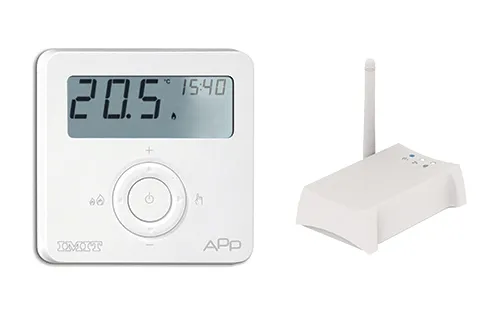
TECHNO APP is a smart system for controlling the home heating system, easy to use, which allows you to control the temperature of all the rooms in your home from anywhere, thanks to the management via App for tablets and/or smartphones, even remotely.
System requirements
In order to install the TECHNO APP you will need:
- Modem router with DHCP feature
- Internet connection
- Mobile device (smartphone or tablet) with iOS (version 7.1 or later) or Android (version 4.1 or later) operating system
- Email account to register your device and remote management via App.
Package contents
- nr. 1 TECHNO RT APP, SMART battery-powered thermostat with LCD display Electronic control device with separate assembly
- nr. 1 IMITBOX gateway, Imitbox Gateway Ethernet-ZigBee gateway to connect to the router (Max no. of supported Thermostats 100 - Status views 3 diagnostic LEDs )
- nr. 1 USB cable/micro USB 1 Ethernet cable
- nr. 1 USB power supply unit 1 Installation manual
Compliance with EC Directives 2006/95/CE, 89/336/EEC, 99/5/EEC
All models comply with 2004/108 CE, 2006/95 CE, 99/5 CEE directives.
The appliance (or the product) must be disposed of separately in accordance with the local waste disposal legislation in force.
IMIT Control System srl hereby declares that these products comply with the essential requirements and other relevant provisions of Directive 1999/5/EC. The Declaration of conformity can be consulted on the website www.imit.it
Warning
It is recommended to install the appliance strictly in compliance with all safety and law provisions in force.
Before connecting the thermostat, make sure that the supply voltage of the UNIT TO BE CONTROLLED (boiler, pump, air-conditioning system, etc.) is NOT CONNECTED and that it matches the indication given inside the appliance (250V~ max).
In case of repeated malfunctioning, please call our Technical Service. Do not tamper for any reason with any part of the thermostat.

All hardware connections must only be carried out by qualified staff or aware of the risks due to installation, following the minimum safety standards and in the absence of live voltage. The user shall assume all liability and risks relating to the installation, configuration and use of the products in order to obtain the expected results from each product. The responsibility of IMIT Control System in relation to its products is governed by the General terms of sale IMIT Control System srl).
Caution!
TECHNO APP must be used exclusively indoors. Use TECHNO APP in dry places and avoid placing it in a damp environment.
Maintenance
To clean TECHNO APP use a slightly damp cloth. Do not immerse the products in liquids or try cleaning them with liquid solvents.
Do not dismantle, open or attempt to repair the product. Opening a sealed component will void the warranty.
Technical specifications
- Power supply
- THERMOSTAT Alkaline battery (2x) AAA 1,5V - GATEWAY 5 V=, 0.4 A, 2 W power supply unit provided
- Battery life
- THERMOSTAT >1 year
- Maximun ambient temperature
- THERMOSTAT +30°C
- Temperature regulation range
- THERMOSTAT -10 ÷ +60°C;
- Temperature resolution
- THERMOSTAT 0,1°C
- Degree of protection
- IP20
- Insulation class
- THERMOSTAT Class II
- Pollution degree
- THERMOSTAT 2
- Software
- THERMOSTAT A
- Heat and fire resistance
- THERMOSTAT Category D
- Storage temperature
- THERMOSTAT -20 ÷ +70°C;
- Selectable “WINTER” or “SUMMER” mode
- Sì, è selezionabile
- “AUTO” function between two temperature levels, NORMAL (T1) and REDUCED(T2)
- Sì, esiste
- Radio specifications
- THERMOSTAT Frequency 2,4GHz - ZigBee HA 1.2 - GATEWAY Frequency ZigBee HA 1.2
- Connections
- GATEWAY 1 Ethernet port RJ45, 1 micro USB for powering
- Router compatibility requirements
- GATEWAY DHCP server function enabled in the router. “Broadcast UDP” function enabled on your router. Active Internet connection.
- Control Relay
- THERMOSTAT NC/COM/NO contacts 250V 5A Cos (Φ) = 1 resistive load
- Temperature precision
- THERMOSTAT ±0,5°C
- Dimensions
- THERMOSTAT (W x H x D) 88.5 x 88.5 x 26 mm - GATEWAY (W x H x D) 110 x 35 x 70 mm
Thermostat control keys

Increase value key: you can increase the value of the desired temperature or increase, in setting mode, the value you want.
Decrease value key: you can decrease the value of the desired temperature or decrease, in setting mode, the value you want.
"BOOST" key: press for >1 second, enable the "Boost" mode.
"ON" key: turns on or off the device in antifreeze mode (heating mode).
Operating mode key: you can choose whether to use the thermostat in manual or automatic mode.

1. Reset button
2. Ethernet port
3. Micro USB input
4. App. enabling key
5. Radio signal network-Thermostats (ZigBee) Blue LED lit up: Gateway connected to the Thermostat Blue LED flashing: searching for the Thermostat
6. Ethernet connection to the local network. White LED on: Gateway connected to the router
7. Internet connection. White LED on: Gateway connected to the Internet server
Installation
Gateway-Thermostat Connection
- Connect the Gateway to your home router with the ethernet cable (fig. 1 A).
- Power the Gateway using the USB cable and the power supply unit supplied (fig. 1 B).
- Insert the batteries in the Thermostat (fig. 2) and place it near the Gateway.
- Verify that your home router is connected to the Internet.
- Verify that within a few minutes all the LEDs on the Gateway are steadily lit.
- Download IMIT APP from the AppStore or Google Play and proceed directly with the wizard from the APP. Verify that, by acting on the IMIT APP, the temperature set-point changes.
- Move RT APP near the thermostat to be replaced.
- Verify that there is radio signal coverage on RT APP side, showing on the display the symbol
 .
- Verify that there is radio signal coverage on the Gateway side: the blue LED should be lit, NOT blinking (fig. 3).


HOW TO REPLACE THE OLD THERMOSTAT
WARNING: cut off power to the thermostat circuit.
- Open the old thermostat.
- Make a picture of the clamp with the wires clamped.
- Identify the control cables COM (Common Cable) and NO (Normally Open), using silk screens, labels and/or wiring diagrams normally present on the old thermostat (fig. 4). WARNING: If you have more than two cables, the others are not needed. Identify them and isolate them with electrical tape.
- Disconnect and remove the old thermostat from the wall.
- Open TECHNO RT APP and remove the protection from the clamps (fig. 5).
- Route the cables trough the mounting plate. Connect the wires to the terminal observing the COM and NO positions. Place and fix (fig. 5).
- Cover the terminals with the cap provided.
- Check the correct position of the batteries (fig. 2) and fix the TECHNO RT APP to the wall.
- Power on.
Check the installation
- Verify that, with the Gateway powered, the display of the Techno RT APP shows the symbol .
- Press the + or - keys until you see a small flame on the display of the THERMOSTAT. In this condition, the heating system must be running, otherwise check the connections and/or THERMOSTAT wires towards the boiler.


Description of controls and operation
COOLING/HEATING mode: you can select the Cooling/Heating mode via IMIT APP.
MAN/AUTO mode: you can use TECHNO RT APP in manual mode by pressing the "operating mode" key, choosing between AUTOMATIC or MANUAL operation. If you choose the manual mode you can also set locally the boiler enabling set-point values using the + and - keys.
BOOST mode: regardless of the operating mode, by pressing the "Boost" key for 1 second you can select a set-point different from the operating mode for a limited period:
- Press the BOOST key
- Set the desired set-point using the + and - keys, and press the ON key
- Set the desired amount of time using the + and - keys, from 1h to 24h with a variation of 30 minutes, and press the ON key
- BOOST mode active
The BOOST function can be activated also via the APP.
To disable the function, press any key on the thermostat RT APP.
Installer menu: With RT APP in OFF mode, by pressing the + key for >6 seconds, you will open the Installer menu in which you can set the following parameters:


"IMIT APP" SMARTPHONE APPLICATION
Free App available on Apple App Store and Google Play Store
Minimum requirements: Apple iOS 7.1; Android 4.1.
Manual printed from https://man.imit.it/en/techno-app-smart-home/